Pages

Showing posts with label unprotect excel sheet. Show all posts

Friday, November 16, 2012

How to Crack Excel Password without Any Software?

-->
Password protection is one of main features of MS Excel which allows user to protect their confidential data from unauthorized access. There are two types of passwords which can be added to an excel file: "Password to Open" and "Password to Modify" (or edit excel sheet). Many times excel user forget their own password and hence loses access to their important (and confidential) data. To help such users I am writing about how to remove "Password to Modify" excel sheet without any software.
  1. Change the file extension of excel file from xlsx (or xls) to zip.

  2. Right click on the zip file and extract the content of this zip file.

  3. In extracted zip folder navigate to location xl->worksheets and right click on the password protected xml sheet.
  4. Open this sheet with Notepad and then search for the tag “sheetProtection”.

  5. Once you find the “sheetProtection” tag then you need to delete this tag and save the file.

  6. Now replace the old xml file (in zip archive) with this edited xml file. (You can also replace complete xl folder simply by dragging it to zip archive).
  7. Now change the zip archive extension from zip to xlsx and open the file.

Now you can edit the excel sheet without any password.
Note: - (a) Always make a backup copy of original excel file to avoid any accidental loss of data.
(b) This method works only with MS Excel 2007 and 2010.
(c) This method does not work to unprotect excel sheet if it is protected with “Password to Open” excel file. In such situation you can use excel password recovery software to open password protected excel file.
I hope that by following the above mentioned steps you can easily remove password of your encrypted excel sheet.
READ MORE - How to Crack Excel Password without Any Software?

Tuesday, October 23, 2012

How to unprotect excel sheet from read only password ?

-->
Password protection is one of the most important features of MS Excel. Password protection feature ensures that only authorized user can see or modify the data of the excel file. This feature allows user to set (mainly) two types of password on excel file: Password to open and Password to modify. First type of password (Password to open) restricts the user from opening the excel file whereas second type of password (Password to modify) can be used to protect excel sheet (or cells) from unauthorized modification.
Many times it happens that the authorized user forget excel file password and hence they also lost access from opening/editing the excel file. In such situation most of the user take help of excel password remover software to recover lost password.
Here I am sharing how you can edit read only password protected excel file without any password remover software.
  1. Login into your Gmail account.

  2. Click on documents (or open http://docs.google.com/ after you have login into Gmail account).
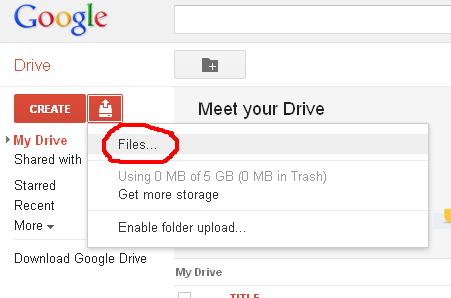
  3. Click Upload Document icon.

  4. Browse the file you want to edit and upload it.

  5. Now open the uploaded file with Google spreadsheet (Click File-> Open with ->Google Spreadsheets) and make the desired changes.

  6. Download the edited file as an Excel file.

  7. Now open the downloaded file. It will open in “Protected View”. Click “Enable Editing” to remove read only password permanently. 

Now your file is unprotected from read only password.

This is one of the best method to unprotect excel sheet without using any password remover software. The only limitation of this method is that it can not be used to remove “password to open” excel file. You can recover “password to open” excel file by using excel password recovery software.
READ MORE - How to unprotect excel sheet from read only password ?

Sunday, October 21, 2012

Unprotect Excel Sheet with Brute-Force Attack and Masking Technique


-->
MS Excel provide many features to manage and analyze large volume of data. Graphical representation tools and inbuilt (mathematical, financial, statistical and logical) functions make it very easy for everyone to analyze and summarize data without any special expertise. Besides so many user friendly features, MS Excel also provides a very useful security feature called “Password Protection” to prevent unauthorized access (or modification) of valuable data. This password protection feature of MS Excel allows User to protect entire workbook, individual sheet or cells of a file. 

Many times it happens that Excel user forget the password enabled by them to protect their worksheet. In such situation it is really very difficult to unprotect excel sheet without password remover software. I searched a lot to find methods of removing excel password without software but did not get even a single method which can do this. From my search I analysed that almost all the excel password remover software are based on two features: Brute-Force Attack Technique and Masking Technique.

Let me explain you how Brute-Force Attack and Masking Technique help to unprotect excel sheet. 

Brute-Force Attack Technique – This technique involves making all possible permutations of characters (lower case letters, upper case letters, special characters, numbers) of your password. All excel password breaker software provides you the option to specify the probable length and characters in your password. On the basis of the password length and characters all possible permutations are made and run through for checking. Total time taken by software to recover excel password directly depends on the total number of permutations (which in turn depends on the length and complexity of your password). 

For example if your password is 3 characters long and include numbers, Upper case and lower case letters then there will be total 62 * 62 * 62 = 238328 guesses or permutations (Here 62 = 26 lower case letters +26 upper case letters + 10 numbers).

Masking Technique – Many time it happens that user remember first few (or any) characters of their password but not able to recall full password. In such situation Masking Technique allows user to specify the initial (remember) characters and replace the unknown characters by '?'. This helps Brute-Force process to search for the unknown characters only and hence reduces the time to crack excel password. 

Overall we can say that because of Brute-Force Attack and Masking Technique excel password remover software has very high success rate. So, if you forget your excel file password then you can use any excel password recovery software based on Brute-Force Attack and Masking Technique.
READ MORE - Unprotect Excel Sheet with Brute-Force Attack and Masking Technique

LinkWithin

Related Posts Plugin for WordPress, Blogger...